Payroll has a date on the calendar. Reality doesn't.
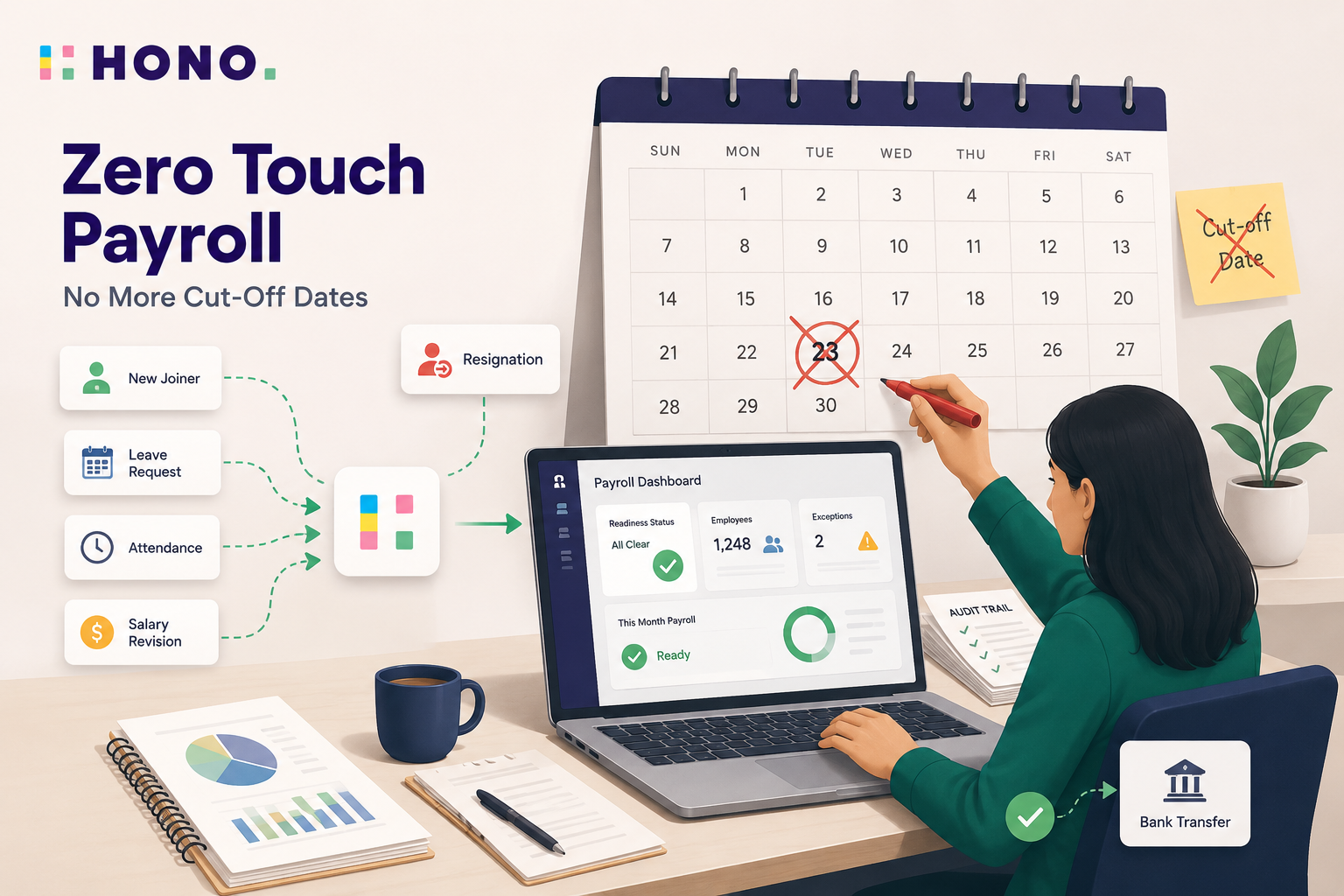
This guide explains what zero touch payroll actually means, how a continuous, always-ready payroll works step by step, and why removing the cut-off date doesn't mean removing the humans who keep payroll safe.
Key takeaways
- Zero touch payroll is continuous, always-ready payroll that removes the monthly cut-off date.
- It removes the deadline, not the humans - people still authorise and sign off.
- Inputs flow in continuously; a readiness dashboard shows if anything's missing right now.
- You can run the payroll cycle on any day of the month - even the 30th.
- A full audit trail plus human sign-off keep it compliant and auditable.
What is zero touch payroll?
Zero touch payroll is a continuous, always-ready approach to payroll that removes the traditional monthly cut-off date. Employee data such as attendance, leave, joiners, exits, and salary changes flows in continuously, so a payroll cycle can run accurately on any day, with a final human sign-off rather than full automation.
The name causes a lot of confusion, so it helps to say what it does not mean. Zero touch does not mean no people: payroll teams still review exceptions, approve changes, and sign off before any money moves. What disappears is the manual grunt work, like the chasing, the exporting, the re-keying, and the rush to beat a deadline.
The real shift is in how payroll runs day to day. Traditional payroll is a monthly batch, where you gather inputs, freeze them on a fixed date, then process everything in one stressful window. Zero touch payroll replaces that batch with a continuous state, so the system stays current and a correct payroll is ready to run whenever you need it.
The "23rd problem": why the payroll cut-off date exists (and what it costs)
Most payroll teams freeze their data around the 22nd or 23rd of the month. That payroll cut-off date exists for a good reason: payroll carries real legal and financial exposure, so you need a fixed point where the numbers stop moving, get checked, and get approved before any money leaves the bank. The freeze itself is sound practice.
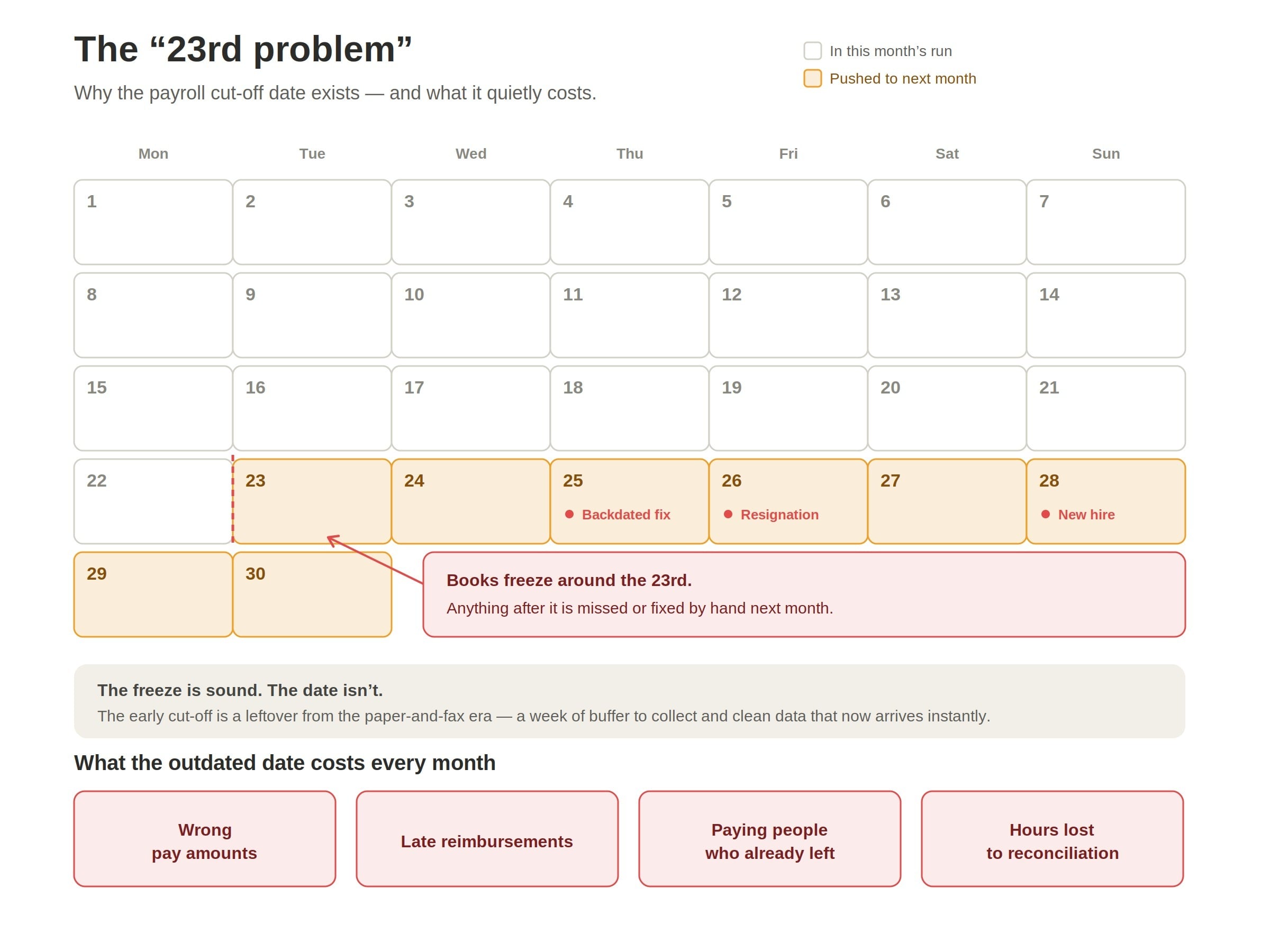
The problem is not the freeze. The problem is the date. The early cut-off is a leftover from a time when payroll data arrived slowly, through paper rosters, emailed spreadsheets, and the occasional fax, so teams needed a week of buffer just to collect and clean everything. The data moves instantly today, but the deadline never moved with it.
That outdated buffer quietly creates errors. Anything that happens after the cut-off, like a new hire on the 28th, a resignation on the 26th, or a backdated salary correction, either gets missed or gets fixed by hand the following month. The result is the month-end pattern every payroll team knows: wrong pay amounts, late reimbursements, paying people who have already left, and hours lost to spreadsheet reconciliation.
How does zero touch payroll work?
The simplest way to understand zero touch payroll is to follow a single pay cycle from start to finish. Instead of a once-a-month scramble, the work is spread across the whole month, and the system stays ready the entire time. Here is what happens, step by step.
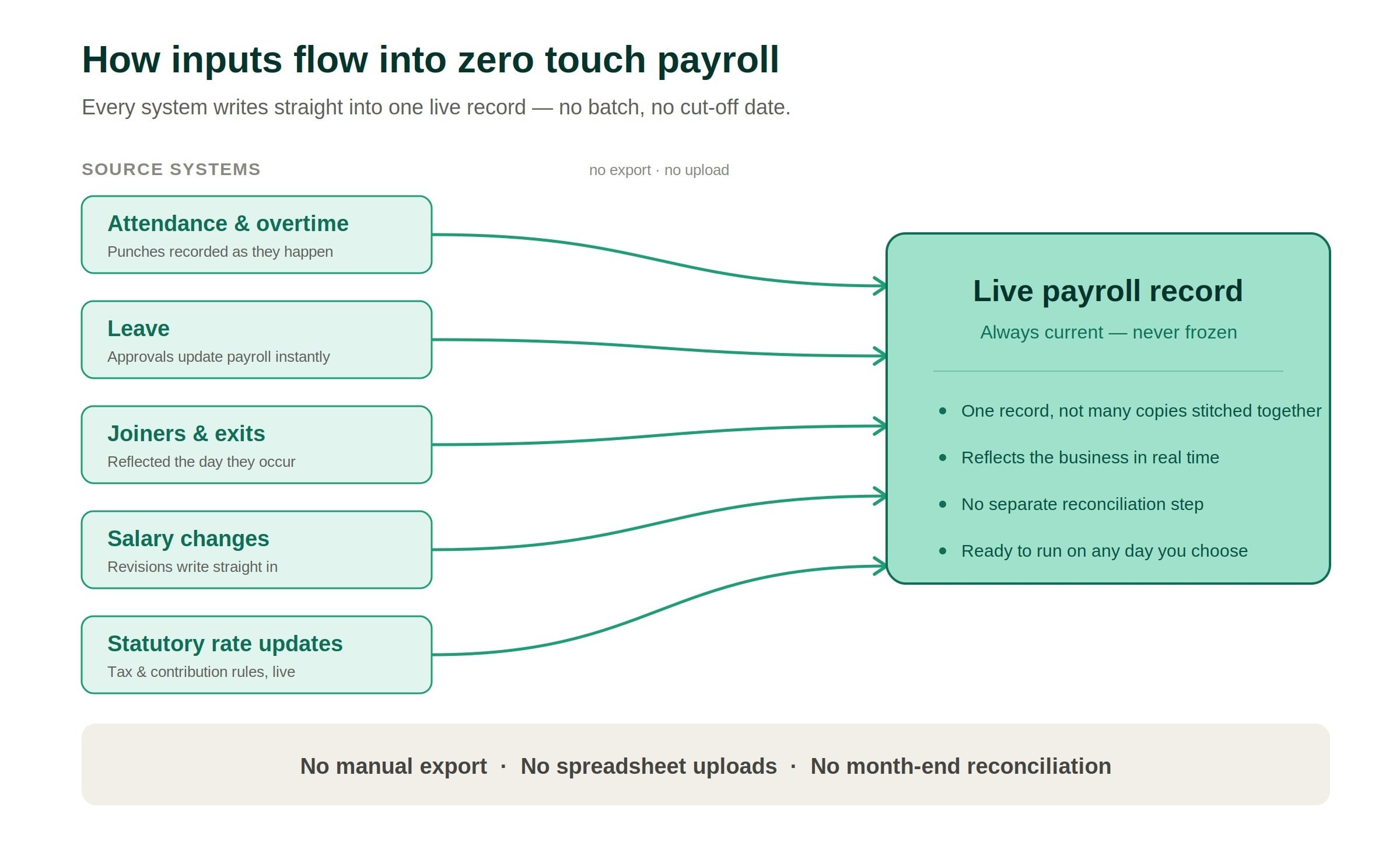
- Inputs flow in continuously. Every part of the system feeds payroll directly as things happen. Attendance, leave, overtime, new joiners, exits, salary changes, and updated statutory rates all write straight into the payroll record, with no manual export, no spreadsheet uploads, and no separate reconciliation step.
- Out-of-order changes are handled safely. Real life does not arrive in neat order, so a backdated correction (say, a leave entry added late) updates only the part of the cycle it affects, not the whole run. Nothing has to be rebuilt from scratch.
- A readiness dashboard replaces the cut-off date. Instead of asking "is it the 23rd yet?", the team asks "is anything missing right now?" The dashboard flags gaps like missing bank details, incomplete KYC, or salary mismatches, and one click takes you to the exact record that needs fixing.
- One calculation engine runs every country. The same engine handles payroll for every location. Country rules such as tax slabs, caps, and contribution formulas are set up as configuration rather than custom code, so adding a country or absorbing a rule change does not mean rebuilding the system.
- The Intelligent Payslip explains every change. Before pay goes out, the system checks each payslip and explains anything unusual in plain language, so a change is understood before it becomes a question.
- A human approves, then payroll runs. Nothing pays itself. A named person reviews the exceptions, authorises the cycle, and releases the bank file, while a full audit trail records every input and calculation behind each number.
The result is simple: because the data is always current and always checked, the cycle is ready to run on any day, not just after a deadline.
Intelligent Payslip: answering "why is my pay different this month?"
An Intelligent Payslip is a payslip that checks itself and explains any change in plain language before the employee has to ask. Rather than comparing your pay to a company average, it compares each component of your payslip against your own history, so it knows what is normal for you and can spot what is not.
When something looks off, it explains it in one clear sentence, such as:
- "Your net pay is lower this month because of four days of unpaid leave."
- "Your tax went up because your annual bonus moved you into a higher slab."
The employee gets the reason along with the number, not just the number.
This matters more than it first sounds. The biggest source of payroll queries every month is some version of "why is my pay different this month?" When the payslip answers that on its own, the month-end pile of tickets to the payroll team mostly disappears, and trust goes up because nothing feels hidden.
It is also part of why the always-ready cycle works. The Intelligent Payslip surfaces anomalies and explains variances as they happen, so issues get caught early instead of arriving as a wave of complaints after payday.
Run payroll on any day, even the 30th
Because the data is always current, you no longer have to process payroll a week early just to be safe. The team can run the cycle the day before money goes out, confident that late inputs are already included. This is what "always-ready," or on-demand payroll, really means: the run is not tied to a date on the calendar, it is tied to whenever you are ready.
That shift removes the month-end scramble. There is no frantic week of collecting, chasing, and freezing data, because the data was never frozen in the first place. The cycle simply reflects the latest state of the business at the moment you choose to run it.
After a run, a post-run dashboard shows exactly what happened: which exceptions came up, what got flagged, and which late inputs were picked up at the last minute. The payroll team can see and resolve issues themselves, without raising a support ticket or waiting on anyone else.
One payroll engine across 25 countries
One of the harder problems in payroll is that every country has its own rules, and most payroll systems solve this by building a separate product for each market. Zero touch payroll takes the opposite approach: a single engine runs payroll everywhere, from India and the UAE to Singapore and Indonesia, on the same platform.
What makes this possible is treating country rules as configuration, not code. Tax slabs, contribution caps, statutory formulas, and bank-file formats are all set up as settings, so adding a new country means configuring it, not rebuilding the system. The core engine stays the same, and only the local rules change.
This design has a useful side effect when laws change. A mid-cycle regulatory update, like a revised tax slab or a new contribution rate, becomes a single configuration change in one place rather than a code change pushed across many separate systems. The same correct payroll is ready to run the moment the rule is updated.
Is zero touch payroll safe? Where humans stay in control
Yes. Removing the cut-off date does not remove oversight: zero touch payroll keeps people in control of every decision that matters, with strict limits on who can change a cycle, a mandatory human sign-off before money moves, and a full audit trail behind every number. Automation handles the busywork, while humans still own the outcome.
Three safeguards do most of this work:
- Role-gated actions. Only specific, authorised roles can reprocess, delete, or roll back a payroll cycle. The sensitive actions are locked down, so a continuous system does not become an open one.
- A required human sign-off. The system never pays anyone on its own. A named person reviews the exceptions, authorises the cycle, and releases the bank file, so there is always a human accountable for the final run.
- A full audit trail. For every employee and every pay head, the system records the formula, the inputs, the intermediate values, and the final amount. Anything can be traced and explained later, which is exactly what an audit needs.
For a deeper, engineering-level look at how these safeguards were built and tested, including the failures that shaped them, see the technical breakdown from HONO's CTO: https://www.prasanthpadharthi.com/writing/zero-touch-payroll
Proven in production: the results so far
Zero touch payroll is not a concept on a slide. It is already running live payroll for early-adopter enterprises across India and Southeast Asia, processing real pay cycles for real employees every month.
The performance holds up at scale. A payroll cycle for around 10,000 employees now completes in under 30 minutes of processing time, so a run that once took days of preparation can happen in a single short window on the day you choose.
Adoption is growing steadily rather than overnight. Roughly 60 to 70 enterprise clients are now live on the modern, zero touch stack, out of a base of more than 300 enterprise clients, with more migrating as they retire the old monthly-batch way of working.
What's next: the "Zero" category
Zero touch payroll is one piece of a bigger pattern. The idea is to find the step in an HR process that quietly slows everything down and remove it, rather than just making that step a little faster.
You can see the pattern building. Zero UI removed the interface bottleneck, so people no longer have to learn and navigate screens to get HR work done. Zero touch payroll removed the calendar bottleneck, so payroll is no longer trapped behind a cut-off date.
The next step is Zero Touch Onboarding, which applies the same thinking to new-hire paperwork and removes the forms bottleneck that slows down a person's first days. Each release chips away at a different point of friction, with the same goal: HR that runs quietly in the background instead of demanding attention.
The bottom line
For decades, payroll has bent the business to fit a date on the calendar. Zero touch payroll flips that around: the data stays current, the system stays ready, and the people who matter stay in control, so a correct payroll can run on any day you choose.
Payroll has a date on the calendar. Reality doesn't. It is time your payroll caught up with reality.
Want the full technical deep-dive, including what broke along the way? Read the engineering breakdown from HONO's CTO → https://www.prasanthpadharthi.com/writing/zero-touch-payroll
Frequently asked
FAQs
See it live
Ready to see HONO in action?
Book a 20-minute demo tailored to your team's HR stack.
Request a demo
About the author
Prasanth
Prasanth is a Disruptive Technology Specialist and technical leader who translates complex business needs into secure, innovative software solutions. A master at guiding and elevating development teams, he specializes in making high-level IT strategies clear, accessible, and highly impactful for the modern enterprise.