
The most expensive onboarding errors are often discovered after the document has already been created.
An offer or assignment letter gets generated, approved and sent out. Then someone notices that the notice period is missing, the rate is in the wrong currency, the end date is incorrect, or a required regional clause has been left out.
At that point, fixing the issue becomes a rework cycle. The document may need to be withdrawn, regenerated, approved again, re-issued and signed again.
Zero Touch Onboarding is designed around a different approach: catch these problems before document generation begins.
The goal is not just to automate document creation. It is to prevent avoidable errors from moving deeper into the onboarding process.
The Problem Starts Before the First Payslip
We have been building around a recurring idea under the “Zero” prefix.
Zero UI treats the interface as optional instead of making employees navigate through it for every action. Zero Touch Payroll applies the same thinking to payroll operations.
Zero Touch Onboarding looks one stage earlier: at the letters, documents, approvals and follow-ups that sit between an agreed hire and the employee or contractor eventually being paid.
The example behind this architecture comes from a real build for a global energy and engineering workforce organisation operating across more than 45 countries and continuously onboarding contractors.
At that scale, onboarding is not a one-time form-filling exercise. It is a continuous flow of offer and assignment letters that need to be assembled from assignment records, checked for the right terms and regional clauses, approved internally and finally countersigned by the contractor.
When this process is manual, it quickly becomes a document factory.
Someone reads the assignment, chooses a template, fills it in, sends it for approval, follows up with the approver, issues it to the contractor, follows up again for the signature, files the completed copy and updates the original system.
The real cost is not creating one letter.
It is the rework created when something goes wrong.
Why the Re-Issue Chase Matters
The single most expensive event in onboarding automation is a letter that goes out wrong.
A missing notice period, a rate in the wrong currency, an end date before the start date, or a region-specific clause that should have been included can all trigger the same sequence once the document has already reached the contractor:
Withdraw the letter → regenerate it → route it for approval again → re-issue it → chase another signature.
The same error caught one stage earlier, before a template is even opened, is much easier to resolve. It can simply be sent back to the person who initiated the assignment with a clear prompt to correct the problem.
That difference shapes the entire architecture.
The cheapest place to catch a problem is the earliest place, and in onboarding that means validating the assignment data before document generation begins.
“An error caught at the gate costs a prompt. The same error caught at the signature costs a re-issue, a re-sign, and a chase.”
Validate Before You Generate: The Three-Tier Gate
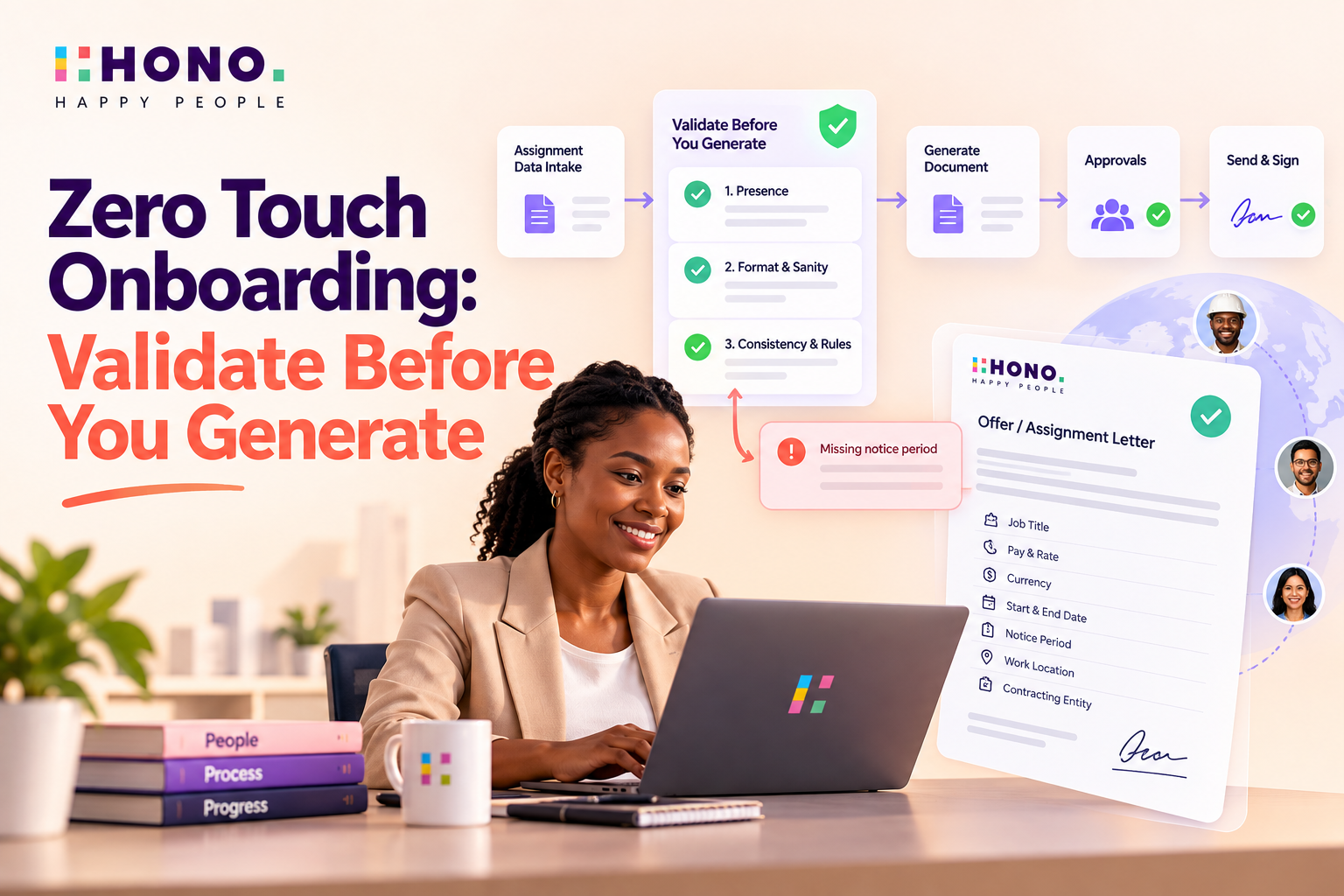
The first step after intake is validation. This happens before any letter is generated.
The validation works in three levels. Each level checks a different type of issue, so that problems can be caught before they move further in the process.
1. Presence
The first check is simple. Every field required for the letter must be available.
This includes:
Name
Job title
Pay and charge rate
Currency
Start and end dates
Contracting entity
Reporting manager
Work location
Notice period
If any required field is missing, the case should not move to document generation.
2. Format and Sanity
The next check looks at whether the data is in the right format and whether it makes sense.
Dates should be readable and in the correct order. Rates should be numeric and within a reasonable range. Currency should match the country, and email addresses should be properly formatted.
This helps catch cases where the data is present, but still not ready to be used.
3. Consistency and Rules
The final check looks at the business and regional rules linked to the assignment.
For example, the system needs to confirm that the correct letter type is being used, that region-specific fields are available where required, that a fixed-term contract has an end date, and that the currency matches the country of the contracting entity.
If everything is correct, the case moves to generation.
If there is a soft failure, such as a missing or incorrectly formatted field, the case is held and sent back to the initiator with a clear explanation of what needs to be fixed.
If there is a hard failure, such as an end date before the start date or an unsupported country, the case is blocked and cannot move further.
“The gate's value is not that it says no. It is that it says exactly why.”
The Zero Touch Onboarding Pipeline
Once the validation logic is in place, the onboarding flow can move through a clear sequence.

Generation Should Be Configuration-Driven
Once an assignment passes validation, the next step is to generate the right document.
The system should not rely on someone remembering which letter or clause to use. The selection should come from defined rules.
In this setup, the template variant is selected using three main factors:
Region
Contracting entity
Employment type
The assignment data is then merged into the selected template.
This approach keeps country, entity and employment-related variations in configuration instead of creating separate code paths for every case.
It also makes it easier to add a new country, entity or document variation later. The required template and the rule for selecting it can be added without changing the overall flow.
The idea is simple:
The letter is assembled from rules, not written from memory.
Human Approval Remains Part of the Process
Automation does not remove the need for human approval.
In this flow, there are two signing points.
First, the internal approver receives the draft and reviews it. Once the approver signs, the document is sent to the contractor.
The contractor then signs as the second party.
This sequence is deliberate. The approver signs first, and the contractor signs only after that step is complete.
The process also keeps a clear record of the signing sequence and the document history.
The purpose of automation here is not to remove people from important decisions. It is to reduce the manual work around document creation, routing, follow-ups and rework.
That allows the support team to spend more time on the exceptions that actually need human attention.
Human Approval Remains Part of the Process
Automation does not remove the need for human approval.
In this flow, there are two signing points.
First, the internal approver receives the draft and reviews it. Once the approver signs, the document is sent to the contractor.
The contractor then signs as the second party.
This sequence is deliberate. The approver signs first, and the contractor signs only after that step is complete.
The process also keeps a clear record of the signing sequence and the document history.
The purpose of automation here is not to remove people from important decisions. It is to reduce the manual work around document creation, routing, follow-ups and rework.
That allows the support team to spend more time on the exceptions that actually need human attention.
The Exceptions Are Where the Product Is Tested
The happy path is usually easy to demonstrate. The real test is what happens when something goes wrong.
Different types of exceptions need to go to the right place.
If the source information is incomplete or invalid, the case should go back to the person who created the assignment.
If the terms are non-standard and need a manual template change, the case should move to the support team.
If an approver asks for changes, the document should be regenerated as a new version so that the history remains clear.
If the contractor declines the letter or asks for an amendment, the process should support a clean re-issue instead of leaving the case in an unclear state.
The important part is not just handling exceptions. It is routing each exception correctly.
If every issue lands in the same queue, the process becomes manual again.
Real onboarding is defined by the exceptions. Designing where each one goes is part of the product.
What Is Working and What Still Needs Integration
There is an important difference between what is already working in the proof of concept and what still depends on external integrations.
The three-tier validation gate, rules-driven letter generation, field merging, approver routing, in-portal signing, and the audit trail with confidence scoring are working end to end with the bundled template engine.
The surrounding integrations are still pluggable stubs.
These include:
The staffing platform where the assignment originates
External e-signature providers
The finance system that receives the executed document
These components sit behind defined interfaces and can be connected when the required credentials and integrations are available.
The architecture also reuses patterns already established in earlier work around timesheets and payslip explanations, including confidence routing, queue-based orchestration, audit structures, and guardrails.
The reasoning service runs on Python using FastAPI and LangGraph. A Node layer using Fastify, Prisma, and a job queue handles orchestration.
The important point is that Zero Touch Onboarding is not being treated as a completely separate architecture. It is another application of the same underlying pipeline.
From Document Automation to Rework Prevention
Most onboarding automation focuses on generating documents faster.
But document generation is only one part of the process.
The bigger improvement comes from preventing incorrect documents from being created and sent out in the first place.
That means validating the assignment before generation, sending incorrect source data back to the person who can fix it, generating documents from defined rules, keeping human approval where it is required, and handling exceptions properly.
It also means maintaining a clear audit trail across the process.
Zero UI removes the interface as the mandatory starting point. Zero Touch Payroll removes the calendar as the driver of payroll operations.
Zero Touch Onboarding applies the same thinking to the document process.
Validate before you generate, keep human approval where it matters, and reduce the re-issue cycle.
Explore Zero Touch HR Operations
See how HONO is applying Zero Touch thinking across HR processes, from onboarding to payroll and other employee workflows.
See it live
Ready to see HONO in action?
Book a 20-minute demo tailored to your team's HR stack.
Request a demo
About the author
Prasanth
Prasanth is a Disruptive Technology Specialist and technical leader who translates complex business needs into secure, innovative software solutions. A master at guiding and elevating development teams, he specializes in making high-level IT strategies clear, accessible, and highly impactful for the modern enterprise.